

How to program a cnc press brake
How to Program a CNC Press Brake: Step-byStep Guide for Accurate Sheet Metal Bending
Programming a CNC press brake is more than entering a bend angle. A well-programmed machine improves bending accuracy, reduces setup time, minimizes material waste, and increases production efficiency. Modern CNC controllers can automatically calculate bend allowances, compensate for springback, and optimize multi-step bending sequences, but accurate programming still depends on correct material and tooling data.
This guide explains the complete CNC press brake programming process used in professional sheet metal fabrication.
What Is CNC Press Brake Programming?
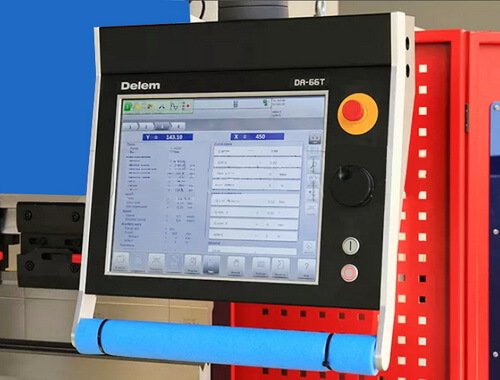
CNC press brake programming is the process of creating a bending program that tells the machine how to manufacture a sheet metal part. The operator enters material information, tooling dimensions, bend angles, flange lengths, and bending sequence into the CNC controller.
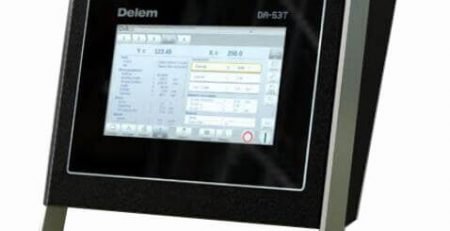
Depending on the controller (such as DELEM, ESA, or CYBELEC), the software automatically calculates ram position, backgauge movement, and bending depth for each operation.

Step 1 – Prepare the Part Drawing
Before programming, collect all production information.
Prepare:
Part drawing or CAD file
Material type
Material thickness
Bend angles
Inside bend radius
Overall dimensions
Production quantity
Tolerance requirements
Accurate drawings reduce programming errors and improve first-piece quality.
Step 2 – Select the Correct Press Brake Tooling
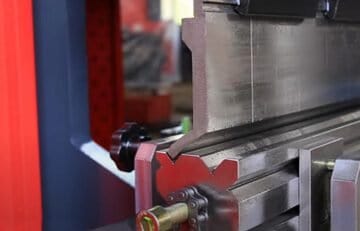
Choose our press brake tooling that matches both the material and bending application.
Consider:
Punch profile
Die opening (V-opening)
Tool height
Tool hardness
Segmented or full-length tooling
Machine clamping standard
Typical examples include:
Application Recommended Tooling
General Air Bending Standard Punch + Multi-V Die
Stainless Steel Hardened Precision Tooling
Box Bending Gooseneck Punch
Hemming Hemming Die
Small Flanges Acute Punch
Related Guide:
How to Choose Press Brake Tooling
Step 3 – Enter Material Parameters
Input accurate material information into the CNC controller.
Typical parameters include:
Mild Steel
Stainless Steel
Aluminum
Thickness
Tensile strength
Bend radius
Incorrect material data may result in inaccurate bend angles because springback varies between materials.
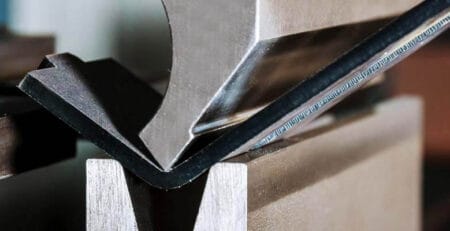
Step 4 – Calculate the Correct V-Die Opening
Selecting the correct V-die is essential for bending accuracy.
General guideline:
Mild steel: V = 6–8 × material thickness
Stainless steel: V = 8–10 × thickness
Aluminum: V = 6–10 × thickness
The selected V-opening directly affects:
Required tonnage
Inside radius
Springback
Surface quality
Related Guide:
Press Brake Tonnage Chart
Step 5 – Set the Backgauge Position
The CNC backgauge positions the workpiece before each bend.
Typical controlled axes include:
X-axis
R-axis
Z1
Z2
Correct backgauge positioning improves repeatability and reduces operator error. check our guide of Press brake back guage
Step 6 – Plan the Correct Bend Sequence
Bend sequence is one of the most important programming decisions.
A proper sequence helps to:
Prevent collisions
Reduce repositioning
Improve dimensional accuracy
Increase production efficiency
Typical order:
Internal bends
Small flanges
Side bends
Final forming bends
Modern CNC software can simulate the bending sequence before production.
Step 7 – Apply Springback Compensation
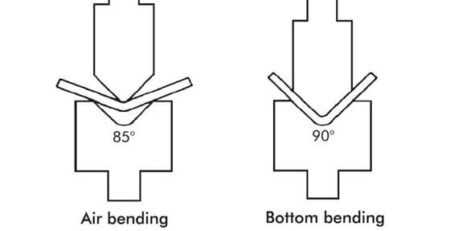
Most sheet metals spring back after bending.
The CNC controller compensates by adjusting ram depth according to:
Material type
Thickness
Bend angle
Tooling geometry
Automatic compensation improves angle consistency during batch production.
Step 8 – Run a Test Bend
Before mass production:
Check:
Bend angle
Flange dimensions
Overall dimensions
Surface quality
Tool alignment
If necessary, adjust:
Bend depth
Backgauge position
Material correction values
Common CNC Press Brake Programming Mistakes
Avoid these common mistakes:
Using incorrect tooling dimensions
Selecting the wrong V-opening
Ignoring material springback
Incorrect bend sequence
Missing collision checks
Using outdated material databases
Incorrect backgauge calibration
Preventing these errors significantly improves production efficiency.
Tips for Improving Programming Efficiency
Professional fabricators often:
Use offline programming software
Store tooling libraries
Create reusable part programs
Standardize tooling setups
Simulate programs before production
Regularly calibrate CNC controllers
These practices reduce setup time and improve repeatability.
Frequently Asked Questions
How long does it take to program a CNC press brake?
Simple parts may take only a few minutes, while complex multi-bend components requiring simulation and optimization may take considerably longer.
Which CNC controller is easiest to program?
Modern controllers from DELEM, ESA, and CYBELEC provide graphical interfaces, automatic bend calculations, and simulation functions that simplify programming.
Can CNC press brakes automatically compensate for springback?
Yes. Most modern CNC controllers include automatic springback compensation based on material properties, tooling, and bending parameters.
Why is bend sequence important?
A proper bend sequence helps avoid collisions, reduces repositioning, and improves dimensional accuracy.
Can CAD files be imported into CNC press brakes?
Many advanced CNC systems support importing CAD or DXF files through offline programming software, reducing manual programming time.
Conclusion
Accurate CNC press brake programming combines proper material data, tooling selection, bend sequencing, and springback compensation to achieve consistent bending quality. By following a structured programming process and using modern CNC controllers, manufacturers can reduce setup time, improve repeatability, and increase productivity in sheet metal fabrication.





Leave a Reply